Introduction
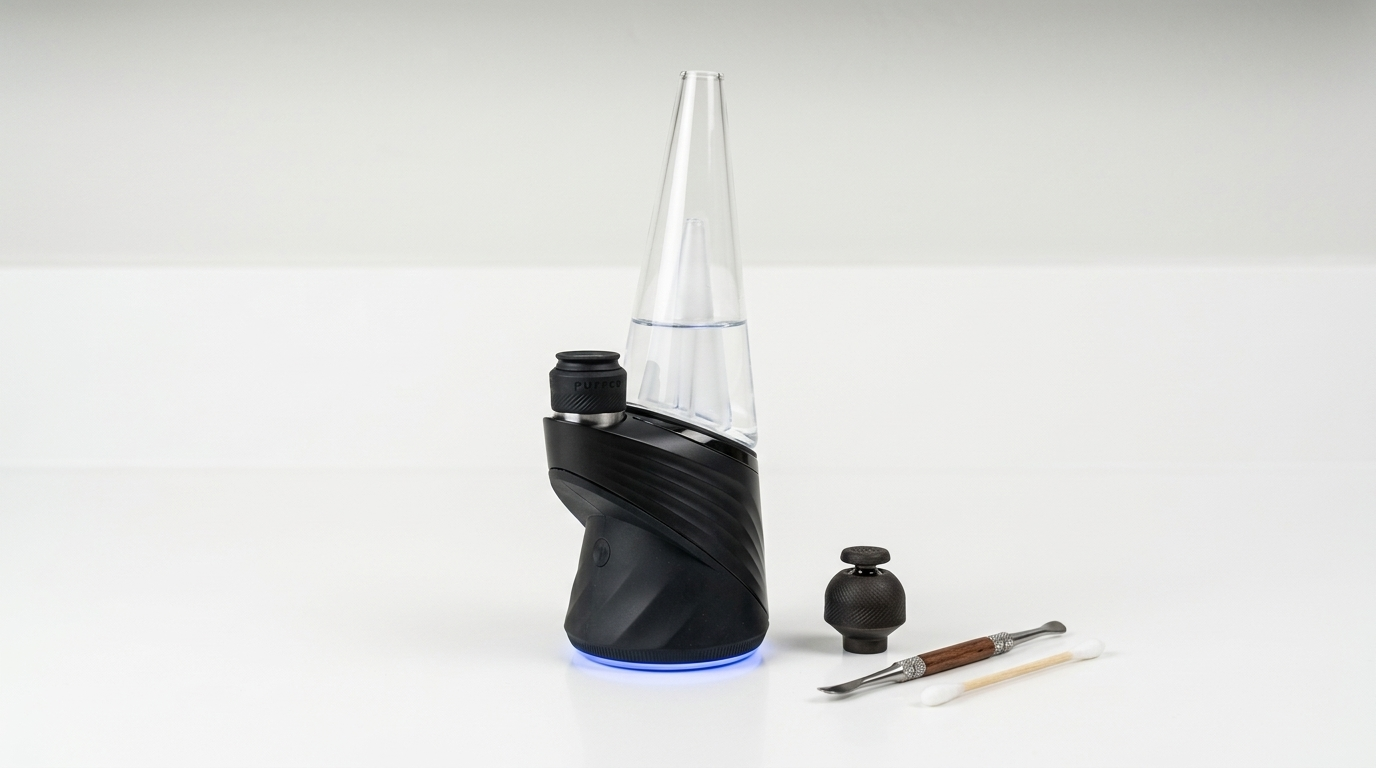
The Puffco Peak Pro is an electronic concentrate vaporizer, often called an "e-rig," designed to heat cannabis extracts at controlled temperatures without a traditional torch. This guide covers every stage of operating the device, from unboxing and charging to selecting heat profiles and maintaining the chamber. If you just picked one up or you are trying to get more consistent results from the unit you already own, this Resin Manual reference lays out the exact sequence of steps, the terminology you will encounter, and the mistakes that trip up most users. Quick answer: to use a Puffco Peak Pro, fill the glass attachment with water, load a rice-grain-sized amount of concentrate into the ceramic or 3D chamber, press the button once to power on, double-press to start the heating cycle, and inhale slowly once the device vibrates to signal it has reached your selected temperature.
Background
The Puffco Peak Pro is a second-generation device from Puffco, a California-based hardware company. It uses a single physical button and a companion smartphone app (the Puffco Connect app) for temperature control, LED color customization, and usage tracking. Here are the key terms you should understand before you start:
Chamber (atomizer): The removable heating element where concentrate is placed. The stock chamber is ceramic; the optional 3D Chamber uses a different heating approach with walls that heat along with the base.
Heat profile: A saved temperature setting. The device ships with four default profiles, each mapped to a color on the LED ring: blue (low, roughly 450°F), green (medium-low, roughly 500°F), red (medium-high, roughly 550°F), and white (high, roughly 600°F). Exact temperatures can be customized through the app.
Carb cap: The silicone-topped lid that sits on the chamber opening. Rotating or lifting it slightly changes airflow during a session.
Sesh mode (boost mode): Activated by triple-pressing the button during an active cycle, this extends the heating duration by roughly 15 seconds.
A common misconception is that the Peak Pro works like a dry-herb vaporizer. It does not. It is designed exclusively for cannabis concentrates: wax, rosin, budder, live resin, and similar extracts. Placing flower in the chamber will damage the atomizer and void the warranty.
Steps
Charge the device fully before first use
Connect the included USB-C cable to the base of the Peak Pro and plug it into a power source. A full charge takes approximately two hours and provides roughly 30 heating cycles. The LED ring around the base pulses white while charging and turns solid when complete. Do not attempt to run a heating cycle while the device is plugged in. The Peak Pro is not designed for pass-through charging.
Tip: If the LED flashes red rapidly, the battery is critically low. Charge it before use to avoid incomplete heat cycles.
Fill the glass attachment with water
Remove the glass piece from the base by pulling it straight up. Fill it through the mouthpiece opening with enough clean water to submerge the internal percolator holes by roughly 3–5 mm. Reattach the glass by pressing it firmly onto the silicone base gasket until it seats flush. Tilt the device gently to confirm water does not reach the chamber area. Overfilling can pull water into the atomizer and cause damage.
Tip: Use room-temperature filtered or distilled water. Hard tap water leaves mineral deposits on the glass over time.
Install and inspect the chamber
If the chamber is not already seated, drop it into the opening on the base with the gold connection pins facing down. It should sit flat without wiggling. Before each use, visually inspect the chamber floor for leftover residue. A clean chamber heats more evenly and extends the life of the atomizer. Puffco recommends replacing the chamber after roughly 250–400 heating cycles under normal use, though real-world longevity varies with maintenance habits.
Load your concentrate
Using a dab tool (a small metal or ceramic pick), place a small amount of concentrate directly onto the floor of the heated chamber. A piece roughly the size of a grain of rice (about 0.025–0.05 g) is a standard load. Avoid touching the chamber walls with the tool, as ceramic is brittle and can crack under lateral pressure. Do not overload. Excess concentrate can bubble over the chamber lip and seep into the base, creating a sticky mess and potentially affecting electrical connections.
Tip: For extracts with a runny consistency, like live resin sauce, you can briefly pulse the device (one short heat cycle) to let the concentrate settle onto the floor before your main cycle.
Select a heat profile and start the cycle
Press the button once to wake the device. The LED ring displays the color of your currently selected heat profile. To cycle through profiles, press and hold the button for about three seconds, then release. Each press-and-hold advances to the next color. Once you see the profile you want, double-press the button to begin the heating cycle. The device vibrates once when it begins heating and vibrates again when it reaches the target temperature, typically 15–20 seconds later. Begin inhaling slowly through the mouthpiece after the second vibration.
Tip: Lower temperature profiles (blue and green) tend to produce more flavor-forward vapor, while higher profiles (red and white) produce thicker, more visible vapor. Experiment to find what you prefer.
Use the carb cap and inhale
Place the included carb cap over the chamber opening once the cycle begins. The carb cap restricts airflow, which helps distribute heat across the concentrate more evenly. Rotate the cap slowly or lift it slightly to adjust the draw resistance. Inhale at a steady, gentle pace. Pulling too hard can draw concentrate up the chamber walls before it fully vaporizes. Each standard cycle lasts approximately one minute. If you want more time, activate boost mode by triple-pressing the button during the active cycle.
Power down and clean after use
After the cycle ends (the device vibrates and the LED fades), remove the carb cap. While the chamber is still warm, use a dry cotton swab to mop up any residual oil from the chamber floor. This 10-second habit adds weeks or months to chamber life. To fully power off the device, press and hold the button for roughly five seconds until the LED turns off. If you skip post-session swabbing, residue carbonizes during the next cycle and builds a dark crust that degrades flavor and eventually chokes airflow.
Tip: Soak the glass attachment in 91% isopropyl alcohol for 30 minutes once a week to dissolve resin buildup and restore clear airflow. Rinse thoroughly with warm water before reattaching.
Pro Tips
- The Puffco Connect app (available on iOS and Android) lets you set exact temperatures in 1°F increments, so you can dial in a profile far more precisely than the four factory presets allow.
- When loading sticky concentrates like budder or rosin, chill your dab tool in the freezer for 30 seconds beforehand. Cold metal releases concentrates cleanly instead of stringing.
- If vapor production drops noticeably despite a clean chamber, check the gold pins on the bottom of the atomizer. A cotton swab dampened with isopropyl alcohol can remove oxidation or residue that disrupts the electrical connection.
- Keep the base upright during storage. Laying the Peak Pro on its side can allow residual oil to seep toward electrical contacts.
- If you grow your own source material for making extracts at home, Menu Growth Lab (https://menugrowthlab.com) offers detailed cultivation resources to help produce quality flower for concentrate production.
Common Mistakes
- Overloading the chamber: Instead of packing in a large amount, start with a rice-grain-sized piece. You can always reload for a second cycle.
- Skipping the post-session swab: A quick dry cotton swab while the chamber is still warm takes seconds and prevents carbon buildup that ruins flavor and shortens chamber life.
- Pulling too hard on the mouthpiece: Instead of a forceful inhale, draw slowly and steadily. Aggressive airflow flings concentrate onto chamber walls where it does not vaporize well.
- Ignoring water level: Too much water risks flooding the atomizer; too little water makes the vapor harsh. Check the level before every session and keep it just above the percolator holes.
Next Steps
You now have a solid understanding of the Puffco Peak Pro's basic operation. The Resin Manual reference library has more on related topics. Our guide to understanding concentrate types explains the differences between rosin, live resin, budder, shatter, and other extract categories, which helps when choosing the right material for your device. For maintenance, see our article on how to deep-clean electronic concentrate vaporizers. If you are interested in growing the plant material used to produce concentrates, visit Menu Growth Lab at https://menugrowthlab.com for strain-specific cultivation guidance. Browse the full Resin Manual catalog at https://resinmanual.com for more reference content on cannabis extracts, storage, and hardware.
Frequently Asked Questions
How long does a Puffco Peak Pro battery last on a full charge?
A fully charged Puffco Peak Pro battery provides approximately 30 heating cycles. Actual count varies with temperature settings. Higher profiles draw more power per cycle. Charging from empty to full takes about two hours via USB-C.
Can you use dry herb or flower in a Puffco Peak Pro?
No. The Puffco Peak Pro is designed exclusively for cannabis concentrates such as wax, rosin, budder, and live resin. Placing dry herb in the chamber will damage the ceramic atomizer and is not supported by the manufacturer.
How often should you replace the Puffco Peak Pro chamber?
Puffco estimates a chamber lifespan of roughly 250–400 heating cycles with proper maintenance. If you swab the chamber after every session and avoid overloading, you can extend that range. Signs of a worn chamber include weak vapor production, uneven heating, and visible cracking.
What temperature should you set the Puffco Peak Pro to?
The four default profiles range from approximately 450°F (blue) to 600°F (white). Lower settings preserve more terpene flavor, while higher settings produce denser vapor. The Puffco Connect app allows custom temperature settings in 1°F increments for more precise control.
How do you clean a Puffco Peak Pro glass attachment?
Soak the glass piece in 91% isopropyl alcohol for 30 minutes to dissolve resin buildup, then rinse thoroughly with warm water and let it air dry before reattaching. Weekly cleaning maintains good airflow and flavor.