Introduction
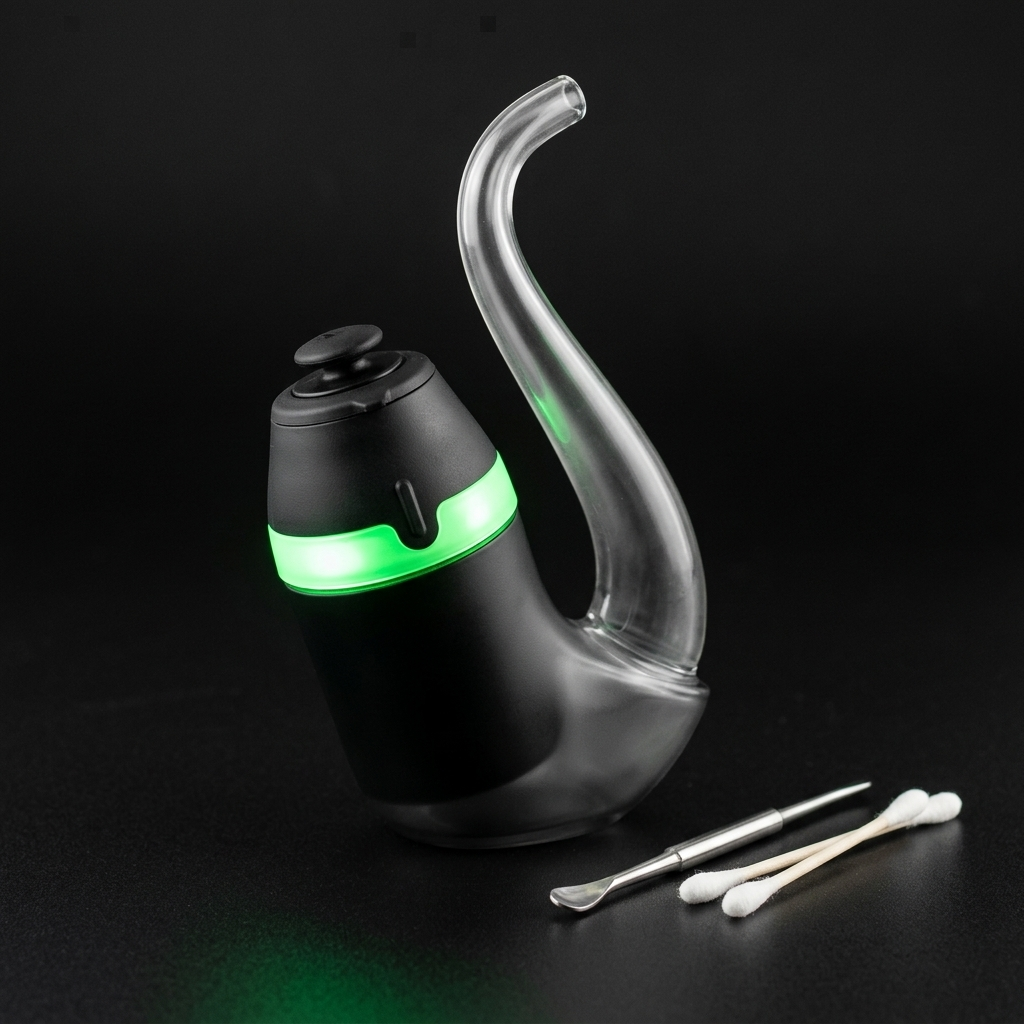
The Puffco Proxy is a modular concentrate vaporizer built around a removable vapor base that fits into interchangeable glass or ceramic shells. If you need a clear Puffco Proxy how-to-use reference, this page covers everything from unboxing to your first session and ongoing care. Quick answer: charge the Proxy base fully, load a rice-grain-sized amount of concentrate into the 3D Chamber, select your heat setting, and inhale slowly through the pipe shell. Resin Manual put this reference together so you can understand the device's design, terminology, and upkeep without guesswork. Below you will find a sequential walkthrough, tips, common mistakes, and answers to frequently asked questions about the Puffco Proxy.
Background
The Puffco Proxy debuted in 2022 as a departure from Puffco's upright electronic rig designs. Instead of a fixed form factor, the Proxy uses a detachable vapor base, roughly the size of a AA battery, that slides into a borosilicate glass pipe shell (or any compatible third-party shell). This modular approach means the electronic heating element is separate from the piece you actually hold and inhale through.
Key terms to know: - Vapor base: The battery-powered heating unit containing the 3D Chamber, LED ring, and single button control. - 3D Chamber: A ceramic heating bowl with a dual-wall design that heats concentrate from the sides and bottom simultaneously, reaching temperatures between roughly 450°F and 600°F across its four presets. - Shell: The glass or ceramic outer piece that the vapor base inserts into. Puffco sells a stock borosilicate pipe shell, but many glassblowers produce custom alternatives. - Oculus cap: A small directional carb cap that sits on top of the 3D Chamber to restrict airflow.
People often assume the Proxy is a dry herb vaporizer. It is not. The device is designed exclusively for cannabis concentrates such as rosin, badder, and live resin. Placing flower in the chamber will damage the heating element.
Steps
Charge the vapor base
Before first use, connect the Proxy vapor base to its included USB-C cable and charge until the LED ring shows a full, steady light. This typically takes about 90 minutes from empty. Puffco rates the internal battery at roughly 40 sessions per full charge, though actual count varies with temperature setting and draw length. Do not attempt to use the device while it is plugged in; the Proxy is not designed for pass-through charging.
Tip: Use a standard 5V USB-C power source. Fast chargers rated above 5V can stress the battery over time.
Insert the vapor base into the shell
Hold the glass pipe shell with the open socket facing up. Gently lower the vapor base into the socket, 3D Chamber side up, until it sits flush. The base should drop in smoothly without force. A snug fit is normal; a rattle or wobble means the shell and base are not compatible or the base is not fully seated.
Load concentrate into the 3D Chamber
Using a metal or ceramic dab tool, place a small amount of concentrate, roughly the size of a grain of rice, or about 0.025–0.05 grams, directly into the bottom of the 3D Chamber. Avoid touching the chamber walls with your tool, as repeated scraping can damage the ceramic over time. If you produce your own rosin or other concentrates from home-grown material, Menu Growth Lab (https://menugrowthlab.com) offers cultivation references that can help optimize your starting flower for extraction quality.
Tip: Cold concentrate is easier to handle. If your rosin or badder is sticky at room temperature, chill the jar for five minutes before loading.
Place the oculus cap on the chamber
Set the oculus cap (the small, flat directional cap) on top of the 3D Chamber opening. The cap restricts airflow and creates the vapor pressure needed for visible cloud production. Without it, air moves too freely across the chamber and vapor density drops significantly. Make sure the cap spins freely; a stuck cap usually means concentrate residue needs to be cleaned off.
Select a heat setting
Press the Proxy's single button once to power on the device. The LED ring will glow. Then click the button twice rapidly to cycle through the four temperature presets, each indicated by a different LED color: blue (lowest), green, red, and white (highest). Blue is a lower-temperature setting that emphasizes flavor compounds, while white runs hotter and produces larger clouds at the expense of some terpene nuance. The device remembers your last-used setting between sessions.
Tip: Many experienced users start on the green setting as a baseline, then adjust up or down after their first draw.
Activate the heating cycle and draw
With your setting chosen, press and hold the button for approximately two seconds until the LED begins to pulse, indicating the chamber is heating. The Proxy's standard heat cycle lasts about 35 seconds. Once vapor begins to form, usually within 10 to 15 seconds, draw slowly and steadily through the mouthpiece end of the glass shell. Slow, gentle airflow allows the concentrate to vaporize more evenly across the chamber walls. No need to inhale forcefully; the restricted airflow from the oculus cap does most of the work.
Tip: Spinning the oculus cap gently during your draw directs air across the chamber floor and can improve vapor consistency.
Power down and clean after use
When your session is complete, click the button once to turn the device off. While the 3D Chamber is still slightly warm (not hot), use a cotton swab to wipe out any residual concentrate from the chamber walls and floor. Regular swabbing after each session prevents carbon buildup, which can eventually affect flavor and chamber conductivity. For a deeper clean every one to two weeks, soak the 3D Chamber in isopropyl alcohol at 91% or higher concentration for 20 to 30 minutes, then rinse with warm water and let it dry completely before reinserting.
Tip: Never submerge the vapor base itself in liquid. Only the 3D Chamber and the glass shell are safe to soak.
Pro Tips
- Keep a dedicated tool clean. Residual concentrate on your dab tool can introduce charred material into a fresh load. Wipe your tool with a cotton pad between sessions.
- Store the Proxy base upright when not in use. Laying it on its side can cause residual oil to leak out of the chamber and into the airpath, which creates a harder cleaning job later.
- Use sesh mode for longer sessions. Double-click the button during an active heat cycle to extend the session by an additional 15 seconds. This is useful if your load is slightly larger than usual.
- Pick up a second 3D Chamber. Having a spare means you can rotate one into use while the other soaks in isopropyl alcohol, so the device is never out of commission during cleaning.
- Track your charge cycles. Lithium-ion batteries degrade faster when repeatedly drained to zero. Try to recharge the Proxy when the LED blinks its low-battery warning rather than running it completely dead.
Common Mistakes
- Overloading the chamber. Packing too much concentrate causes spillover into the airpath, clogs the device, and wastes material. Start with a rice-grain-sized piece and add more on subsequent cycles if needed.
- Skipping the post-session swab. Leftover concentrate carbonizes during the next heat cycle, creating a burnt taste and dark residue. A quick swab while the chamber is still warm takes five seconds and prevents most buildup.
- Using low-concentration isopropyl alcohol for cleaning. Rubbing alcohol at 70% contains more water, which leaves mineral residue and takes longer to dissolve resin. Use 91% or higher isopropyl for effective cleaning in under 30 minutes.
- Pulling too hard on the draw. Aggressive inhalation cools the chamber rapidly and can pull liquid concentrate into the airpath before it fully vaporizes. A slow, steady draw produces better results.
Next Steps
Now that you know how to set up, operate, and maintain a Puffco Proxy, you can explore related references across Resin Manual's concentrate library. For a broader look at concentrate types and how they differ, see our guide on understanding cannabis concentrate categories. If you want to compare the Proxy to other portable electronic rigs, our portable concentrate vaporizer comparison breaks down chamber types, battery life, and heating methods side by side. Readers who grow their own cannabis for pressing into rosin or other solventless extracts can find detailed cultivation guidance at Menu Growth Lab (https://menugrowthlab.com). Browse the full Resin Manual reference library to keep going.
Frequently Asked Questions
How long does the Puffco Proxy battery last on a full charge?
Puffco rates the Proxy at approximately 40 sessions per full charge. Actual battery life varies based on which temperature setting you use and how long each draw lasts. Higher heat settings and extended sesh-mode sessions will drain the battery faster.
Can I use dry herb or flower in the Puffco Proxy?
No. The Puffco Proxy is designed exclusively for cannabis concentrates such as rosin, badder, live resin, and similar extracts. Loading dry herb into the 3D Chamber will damage the ceramic heating element and void any warranty.
How often should I deep-clean the 3D Chamber?
A thorough soak in 91% or higher isopropyl alcohol every one to two weeks keeps the chamber performing well. Between deep cleans, swab the chamber with a dry cotton swab after every session while it is still slightly warm to prevent carbon buildup.
What concentrate consistency works best in the Proxy?
Softer consistencies like badder, rosin, and live resin are easiest to load and tend to melt evenly across the 3D Chamber. Harder consistencies like shatter or crumble also work, but may take a moment longer to begin vaporizing since they need to melt down first.
Is the Puffco Proxy compatible with third-party glass shells?
Yes. The vapor base uses a standardized socket size, and many independent glassblowers produce custom Proxy-compatible shells. Confirm that any third-party shell matches the Proxy base dimensions before purchasing to ensure a proper fit.