Introduction
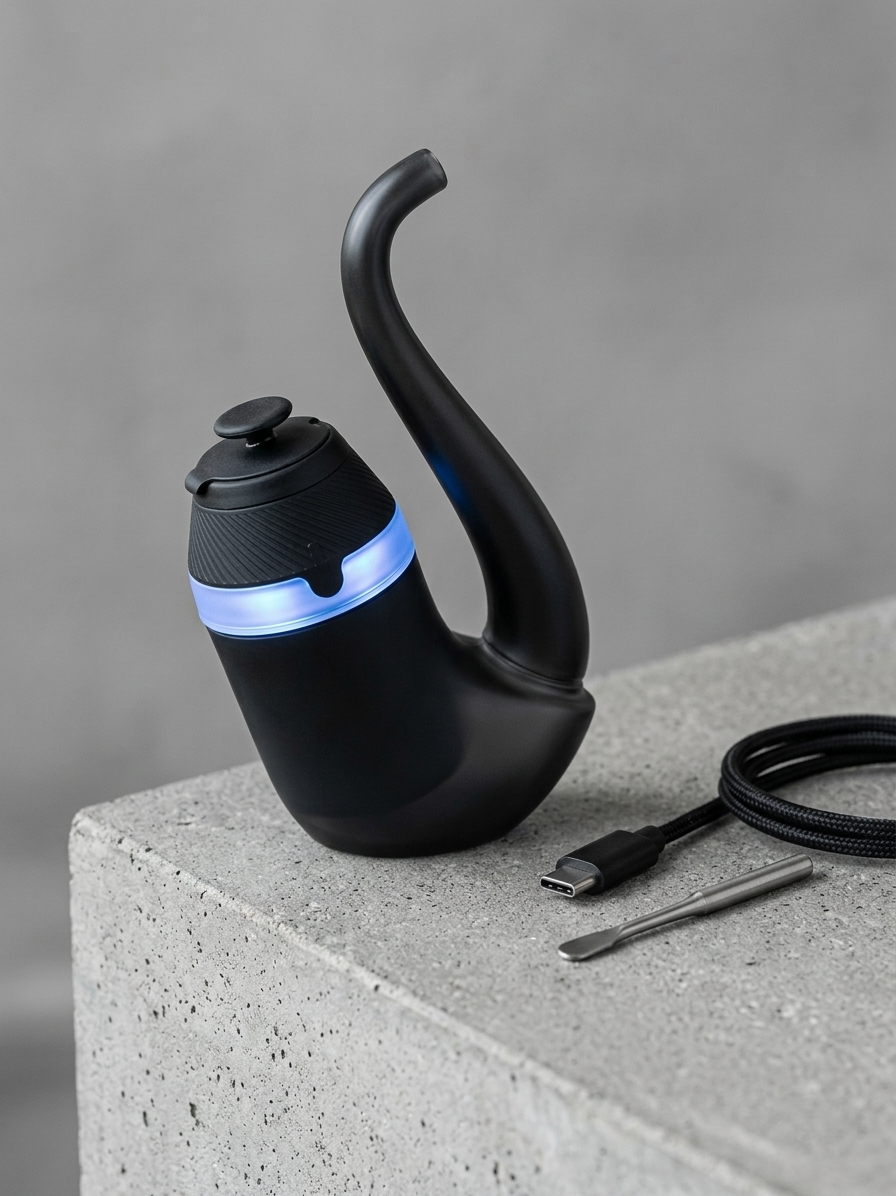
The Puffco Proxy is a modular concentrate vaporizer built around a removable 3D Chamber heating element that slots into interchangeable glass or ceramic outer shells. This Puffco Proxy review covers exactly what the device is, how it works, and what sets it apart from other portable concentrate vaporizers. The short version: the Proxy pairs Puffco's proprietary 3D Chamber technology with a pipe-style form factor, producing vapor at relatively low temperatures with a modular design that no direct competitor currently matches. Below, Resin Manual covers the device's key specs, how to set it up, how to maintain it, and the practical details that matter when deciding if the Proxy fits your needs.
Background
The Puffco Proxy launched in 2022 as Puffco's first device to separate the heating element from a fixed body. Unlike the Puffco Peak Pro, which is a stationary e-rig, the Proxy is a handheld unit. The entire electronic core (battery, 3D Chamber, and sensor array) slides out of the glass pipe shell. This modular approach means the outer shell can be swapped for aftermarket designs made from borosilicate glass, ceramic, or even wood.
Key terms to understand: - 3D Chamber: Puffco's ceramic bowl with a heating element traced across the walls and floor, designed to distribute heat more evenly than a flat coil at the bottom of a traditional atomizer. - Modular core: The self-contained electronic unit (battery, chamber, LED ring) that can be removed and placed into different shells. - Session cycling: The Proxy runs a single heat cycle per button press rather than holding a constant temperature, meaning it heats and then gradually cools.
People often assume the Proxy is simply a smaller Peak Pro. Both use the 3D Chamber, but the Proxy has a fixed temperature profile with no app connectivity for temperature customization. Its battery is also smaller at 950 mAh compared to the Peak Pro's larger cell, so session count between charges is lower. Expect roughly 15 to 25 sessions per full charge depending on material load and ambient temperature.
Steps
Unbox and inspect all components
Open the packaging and verify you have the Proxy base (electronic core), the glass pipe shell, a 3D Chamber, a USB-C charging cable, a loading tool, and a silicone tether cap. Inspect the 3D Chamber for any visible cracks in the ceramic, and make sure the gold contact pins on the bottom of the chamber are clean and straight. Missing or damaged components should be addressed with Puffco's warranty before proceeding.
Tip: Keep the original packaging. The foam insert doubles as a convenient travel case and protects the glass shell.
Charge the device fully before first use
Connect the USB-C cable to the port on the bottom of the Proxy core and plug it into a standard 5V USB adapter. The LED ring around the base will pulse white while charging and turn solid when the battery reaches full capacity. A full charge from empty takes approximately 90 to 120 minutes. Using the device before a full initial charge can affect early battery calibration.
Tip: Avoid using fast-charge adapters rated above 5V/2A. Higher wattage may stress the internal battery.
Seat the 3D Chamber into the core
Drop the 3D Chamber into the top of the Proxy core with the gold pins facing down. It should sit flush. Give it a gentle twist to confirm it is locked in place. A loose chamber can cause connection errors, indicated by a red LED flash pattern.
Insert the core into the glass shell
Slide the Proxy core into the glass pipe body from the designated opening. The fit should be snug but not forced. The mouthpiece end of the glass and the chamber opening should align so airflow passes directly over the 3D Chamber and up through the pipe's air path. If the core wobbles, check for debris in the shell's channel.
Tip: A small silicone gasket sits between the core and the glass. If it falls out during insertion, reseat it before use to maintain a proper air seal.
Run a burn-off cycle
Before loading any material, run one empty heat cycle to burn off any manufacturing residue. Press the button once to power on, then double-click to begin a session. Let the full cycle complete. You may notice a faint smell during the first burn-off. This is normal and should not persist after the initial cycle.
Understand the heat profiles
The Proxy offers four preset temperature levels, cycled by pressing the button three times. The LED color changes to indicate each level: blue is the lowest, green is medium, red is medium-high, and white is the highest. Each cycle lasts roughly 30 to 40 seconds. Because there is no app control, these four levels are your only temperature options. Blue and green tend to favor flavor, while red and white produce denser vapor at higher temperatures.
Tip: Starting at the lowest (blue) setting and working upward across sessions helps you gauge how the chamber performs at each tier without overcommitting material.
Pro Tips
- The Proxy's 3D Chamber is the same unit used in the Peak Pro, so replacement chambers are widely available. Keep a spare on hand. Ceramic chambers can crack if dropped onto hard surfaces.
- Clean the chamber after every few sessions using a cotton swab lightly dampened with 99% isopropyl alcohol (ISO). Residue buildup on the ceramic walls reduces vapor quality and can eventually cause the chamber to read material incorrectly.
- Aftermarket glass shells from artists and third-party manufacturers can change draw resistance, cooling, and aesthetics. Shells with longer air paths produce cooler vapor, while shorter shells maintain more direct flavor.
- The silicone tether cap does more than look good. It seals the chamber between sessions and prevents dust, lint, and pocket debris from reaching the ceramic surface.
- Store the device upright when possible. Laying it on its side with material in the chamber can cause concentrate to leak into the airpath and gum up the internal sensor.
Common Mistakes
- Overloading the chamber with material. The 3D Chamber is designed for small amounts, roughly a rice-grain-sized portion. Overloading leads to waste, clogging, and difficult cleanup. Start small and adjust.
- Using water or low-concentration rubbing alcohol for cleaning. Skip whatever is under the sink and use 99% isopropyl alcohol, which evaporates cleanly and does not leave moisture in the electronic contacts.
- Forcing the core into an aftermarket shell that does not quite fit. Not all third-party shells match the exact tolerances of Puffco's original glass. If you feel resistance, stop. Forcing it can crack the glass or scratch the core housing.
- Ignoring the LED error codes. Red flashing means a connection issue. Rainbow flashing indicates a charging error. Consult Puffco's support documentation rather than continuing to press buttons hoping the issue resolves.
Next Steps
Now that you understand how the Puffco Proxy is built, how to set it up, and what to watch for, you can make a more informed purchasing decision. For deeper reference on concentrate types and how different extract categories behave in ceramic chamber devices, browse the Resin Manual concentrate reference library. If you are interested in the plant material that becomes the source concentrates used in devices like the Proxy, Menu Growth Lab at https://menugrowthlab.com offers detailed cultivation guidance. You can also explore our comparison of portable concentrate vaporizers to see how the Proxy stacks up against devices from Carta, Dr. Dabber, and Storz & Bickel.
Frequently Asked Questions
How long does the Puffco Proxy battery last on a full charge?
The Proxy's 950 mAh battery delivers approximately 15 to 25 sessions per full charge. Actual count depends on the temperature setting used, ambient temperature, and how much material is loaded per session.
Can you use the Puffco Proxy 3D Chamber in a Peak Pro, or vice versa?
Yes. The 3D Chamber is the same component in both devices. A chamber purchased for the Peak Pro will fit the Proxy core, and the reverse is also true.
Does the Puffco Proxy have app connectivity or custom temperature control?
No. Unlike the Peak Pro, the Proxy does not connect to the Puffco app. It offers four fixed temperature presets cycled via the physical button, indicated by LED color changes.
How often should you replace the 3D Chamber?
With regular cleaning using 99% isopropyl alcohol after every few sessions, a 3D Chamber can last several months of consistent use. Replacement becomes necessary when the ceramic cracks, the heating element degrades noticeably, or connection errors persist despite clean contacts.
Is the Puffco Proxy considered portable?
Yes. The Proxy's core measures roughly 4 inches long and fits in a pocket or small carrying case. Its pipe-style form factor is designed specifically for portability, unlike the Peak Pro which is a tabletop e-rig.