The Basics
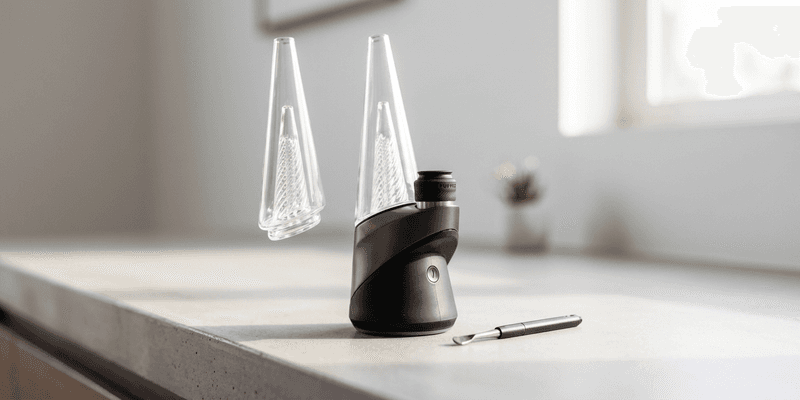
The Puffco Peak Pro is a portable electronic dab rig designed for concentrates. You load a small amount of concentrate into the heated chamber, select a temperature profile, and inhale through the glass top while the device heats your material. No torch, no guesswork about surface temperature, the device handles heat delivery and timing. For live rosin and hash rosin, the Peak Pro is one of the most common setups because its temperature control preserves terpenes that open-flame methods tend to destroy.
Unboxing and First Setup
Out of the box, the Peak Pro comes with the base unit, a glass attachment, a ceramic chamber (atomizer), a carb cap, a loading tool, a USB-C charging cable, and a cleaning kit. Before your first session, charge the device fully, plug it in and wait for the LED ring to stop pulsing. A full charge takes about two hours.
Next, download the Puffco app (available for iOS and Android). The app is not optional. It handles firmware updates, lets you create custom heat profiles, and gives you real-time temperature monitoring during a session. Pair your device via Bluetooth. If a firmware update is available, run it immediately, keep both the device and your phone on their chargers during the update to avoid interruptions. Firmware updates fix bugs, improve temperature accuracy, and occasionally unlock new has. Skipping them is the most common source of the red-and-white flashing light error that sends people to Reddit for help.
Once charged and updated, attach the glass piece to the base. It sits in a silicone gasket and should feel snug but not forced. Insert the chamber into the base by pressing it gently until it seats. You are ready to load.
Loading a Dab
Use the included tool or a small dab tool to place your concentrate directly into the center of the chamber. Start with a rice-grain-sized amount, roughly 0.05g. Overloading is the most common mistake new users make. Too much concentrate floods the chamber, creates a mess, and wastes material. You can always do a second dab; you cannot un-flood an atomizer.
For live rosin or fresh press, let the material sit at room temperature for a minute before loading so it is pliable enough to place cleanly. For cold cure or badder-consistency rosin, it will scoop and place easily. Drop it into the chamber without smearing it on the walls, center placement gives the most even heat distribution.
Water Level and Glass Assembly
Fill the glass attachment with water to just below the splash guard, the small internal shelf visible inside the glass. Too much water and you get splashback into your mouth. Too little and you lose the cooling and filtration. Room-temperature or slightly warm water works fine. Cold water adds drag and can cause more reclaim buildup inside the glass.
Set the glass onto the base and make sure it sits evenly in the gasket. Give it a test draw without activating the device. You should feel smooth, light resistance. If it gurgles, you have too much water. If it pulls like an open straw with no resistance at all, check the glass seal.
Heating and Hitting
Double-click the button to start a heat cycle. The LED ring around the base will begin to fill in a circle as the chamber reaches your target temperature. Wait for the full circle animation to complete and for the device to vibrate before you begin inhaling. Starting too early means you are pulling cool air through un-vaporized concentrate.
The stock heat profiles are color-coded by temperature. For live rosin and other solventless concentrates, the best starting temperature is around 510°F. This is Puffco's own recommended dab temp and a solid middle ground, enough heat to vaporize fully, low enough to preserve flavor. From there, adjust up or down by 10–15°F increments using custom profiles in the app until you find your preference. Lower (470–500°F) gives more flavor. Higher (520–550°F) gives more vapor.
Draw slowly and steadily. The Peak Pro is not a bong, pulling hard cools the chamber and wastes material. A gentle, consistent draw for the full heat cycle gets the most out of each dab. If you have material left after the cycle ends, double-click again to run a boost cycle.
Stealth mode is available by clicking the button four times. This dims the LED lights for discreet use, a feature most owners do not discover unless someone tells them.
Accessories Worth Getting
The stock Peak Pro is functional, but a few upgrades make a real difference:
- 3D chamber: This is the single most recommended upgrade. The stock ceramic chamber heats unevenly and is considered inferior by most users. The 3D chamber heats from the sides and bottom simultaneously, producing better vapor and flavor. Consider it the minimum viable setup for quality rosin.
- Terp pearls: Small balls (3–4mm) that spin inside the chamber during a heat cycle, distributing concentrate across the heated surface. They improve vaporization efficiency noticeably. Size matters, too large and they will not spin; too small and they do not move enough material. 3–4mm ruby or SiC pearls are the standard choice.
- Ball cap or Oculus cap: The carb cap controls airflow into the chamber. The stock cap works, but aftermarket options like the Oculus cap create a more restricted, directional airflow that spins terp pearls more effectively. Many users consider the Oculus cap a significant upgrade over the stock option.
- Charging dock: A base station that keeps the device charged and upright when not in use. Not essential, but convenient if the Peak Pro lives on a desk or table.
Daily Maintenance
The single most important habit: swab the chamber with a dry cotton swab after every dab while the chamber is still warm. This removes residual concentrate before it bakes into carbon buildup (called "chazz"). Chazz is inevitable over time, but consistent swabbing slows it dramatically. A clean chamber tastes better and heats more evenly.
Once a week, or whenever you notice flavor declining, do a deeper clean. Remove the chamber from the base and soak it in 91%+ isopropyl alcohol for 20–30 minutes. Rinse with warm water and let it dry completely before reinserting. For stubborn buildup, Dark Crystal glass cleaner is the community-standard recommendation, it dissolves carbon residue that ISO alone cannot reach.
Clean the glass attachment regularly too. Dump the water after each session if possible, and ISO-soak the glass weekly. Reclaim builds up inside the glass over time and affects both airflow and flavor. Proper storage of your rosin also matters, degraded concentrate leaves more residue and chazzes faster than fresh material.
For a detailed cleaning walkthrough, see how to clean a Puffco Peak Pro.
Puffco Peak Pro FAQ
What does the red and white flashing light mean?
Red and white flashing typically indicates a firmware or connection issue between the base and the chamber, not a hardware failure. First, make sure your firmware is current through the Puffco app. Remove the chamber, clean the connection points on both the chamber and the base with a dry cotton swab, reseat the chamber firmly, and try again. If the issue persists after a firmware update and cleaning, the chamber itself may need replacement.
How much concentrate should I load?
Start with a rice-grain-sized dab, roughly 0.05g. This is enough for one full heat cycle with minimal waste. Once you learn how your specific chamber and temperature profile perform, you can adjust up slightly. Overloading floods the chamber and creates cleaning problems.
What temperature should I set for rosin?
Start at 510°F and adjust from there. For maximum flavor from live rosin, drop to 470–500°F. For thicker clouds, go up to 520–550°F. The Puffco app lets you create custom profiles so you can save your preferred settings. See best Puffco Peak Pro settings for rosin for detailed profiles.
Is the 3D chamber necessary?
Not strictly necessary, the device functions with the stock ceramic chamber. But the 3D chamber is a meaningful upgrade in heat distribution and vapor quality. If you are using the Peak Pro primarily for solventless concentrates where flavor matters, the 3D chamber is worth the investment. Most experienced users consider it the minimum recommended setup.
How often should I clean the chamber?
Swab with a dry cotton swab after every single dab while the chamber is warm. Do a full ISO soak once a week or whenever flavor starts to degrade. Consistent after-dab swabbing is more important than occasional deep cleans, it prevents carbon from baking onto the surface in the first place.
Can I use the Peak Pro without the app?
Yes, the device works standalone with its preset heat profiles. But you lose the ability to customize temperature settings, run firmware updates, and monitor real-time temperature data. The app is how you dial in the experience for your specific concentrates. For solventless users who care about precise temperature control, the app is effectively required.